Minigrid
Skip to product information
1 of 1

MICRO-SHIFT. MAXIMUM GROOVE.

Minigrid

Minigrid

Intro deal extended get 35% with code "MG35" - Minigrid is a 4-track MIDI sequencer VST3 / AU / AAX plugin for building drum patterns fast, with shuffle control and per-sound time-shifting to nail the groove, plus the ability to trigger external synths and hardware instruments via MIDI.

Regular price $29
Regular price Sale price $29
Sale
Shipping calculated at checkout.
Start Trial

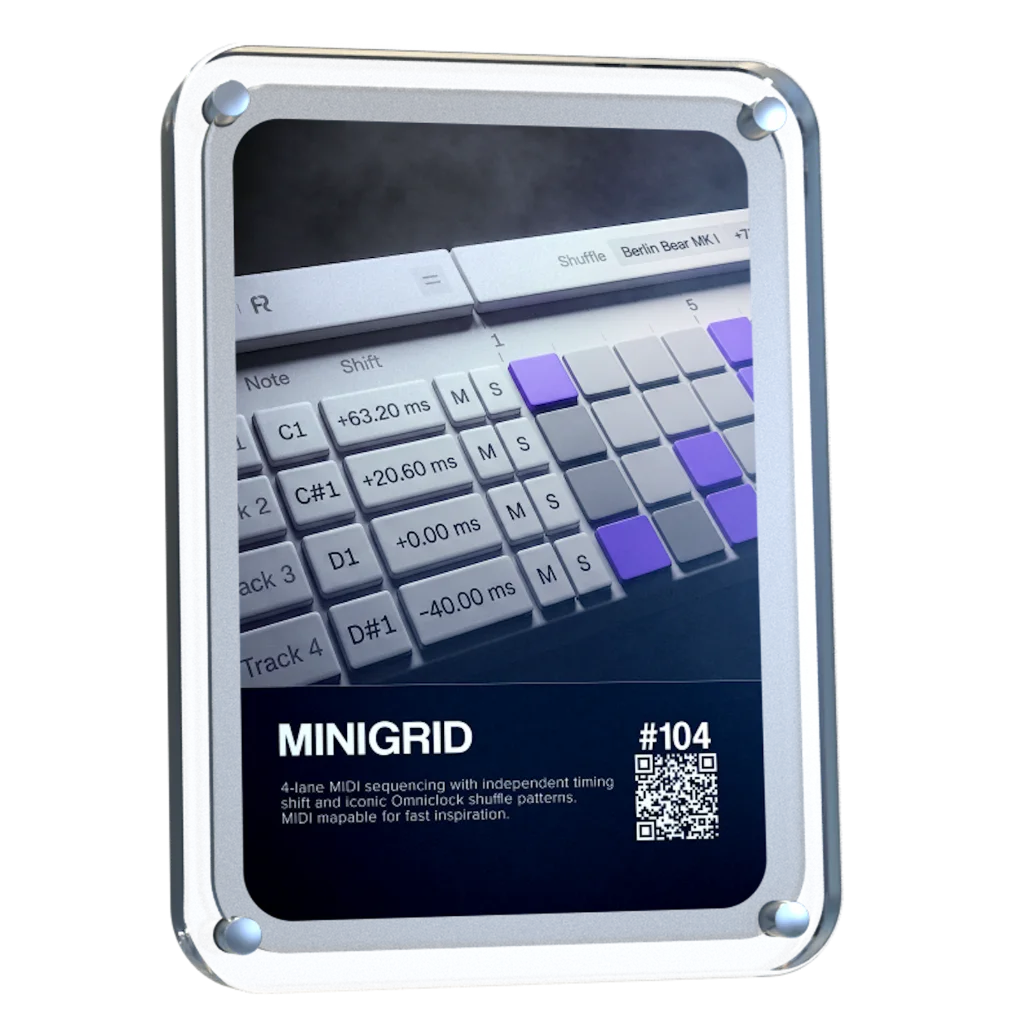
4-lane MIDI sequencing with independent timing shift and signature Omniclock Shuffle

Producers icon 15.000 producers
4.9/5 rating
View full details

A STEP SEQUENCER BUILT FOR THE POCKET

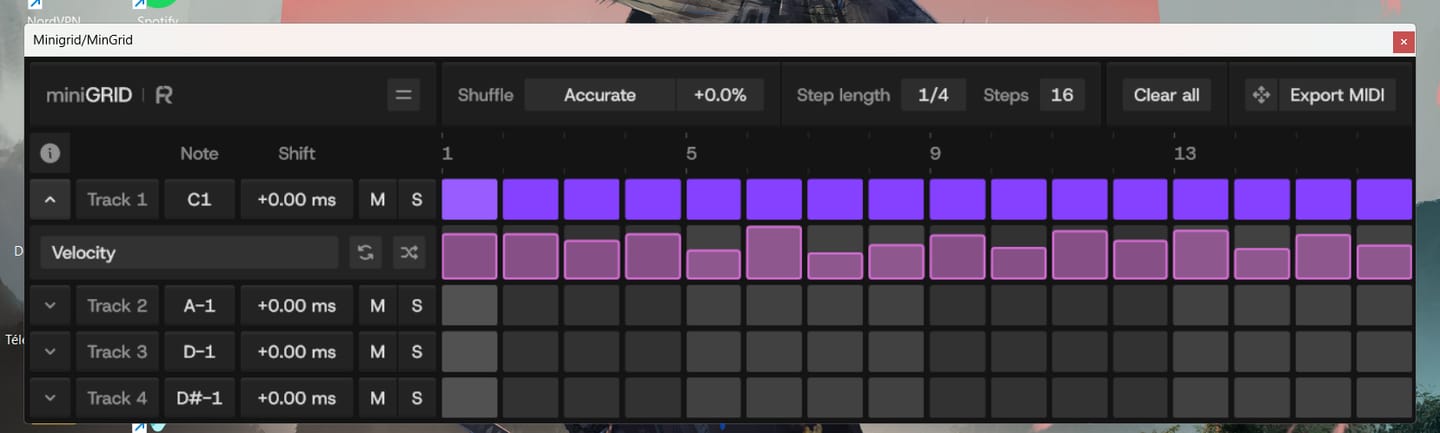
MiniGRID combines step sequencing with precise timing and groove control. Build patterns across 4 MIDI lanes, then push, pull, and shuffle notes to shape how every sound sits against the beat.

  • -64 ms to +64 ms shift per lane
  • Up to 32-step sequences + Adjustable step length
  • Route MIDI to any compatible plugin

Groove, Down to 0.02MS

The #1 most-requested feature from the Omniclock community is finally here. miniGRID brings hardware-style timing shift and swing directly into your DAW, giving you precise groove control over any plugin instrument in your session.

  • 0.02 ms Timing Resolution
  • Push or Pull Lanes Independently
  • Dial Every Hit Into the Pocket
Start Trial

Fully functional 45 day trial

Shift Each Lane. Find the Pocket

Control the timing of every lane independently. Push or pull notes until each sound sits exactly where it feels right against the beat.

  • ±64 ms shift range
  • Push snares early
  • Stays synced to your DAW’s transport

Add Omniclock's Signature Shuffle

Bring the signature Shuffle patterns from Omniclock directly into your sequences. Choose a pattern, dial in the amount, and add movement and groove to patterns that would otherwise sit straight on the grid

  • Iconic Shuffle Profiles (9×9, M60, EM-12 BIT & more)
  • Global Shuffle Across All 4 Lanes
  • Bring Static Patterns to Life

Sequence The Plugins You Already Use

Minigrid sends MIDI into compatible software instruments, letting you build and shape sequences using the sounds already in your setup.

  • Choose the MIDI note; Each lane triggers:
  • Sequence Drums, Percussion, Basses, Leads & More
  • Locks to Your DAW’s Transport & Playback

Small Grid. Serious Control

  • 4 Independent MIDI Lanes
  • Up to 32-Step Sequences
  • -64 ms to +64 ms Time Shift Per Lane
  • Omniclock Shuffle Modes
  • Adjustable Shuffle Amount & Step Length
  • Assignable MIDI Note Per Lane
  • Direct MIDI Output to Any Compatible Plugin
  • DAW Transport Sync
  • Automatable Main Parameters
  • Per-Lane Mute & Solo
  • Resizable Interface Up to 400%
  • Light & Dark Theme Options

Trusted by the biggest names in Music Tech

  • Waldorf Music
  • RND
  • Dangerous Music
  • Focusrite
  • Slate
  • Ableton
  • Bitwig
  • LTL
  • Avalon
  • SSL
  • AudioScape
  • SPL
  • WES Audio
  • Novation
  • Strymon
  • Steinberg
  • Apple
  • AVID

The difference is obvious

miniGRID

  • Per-lane timing Shift
  • Omniclock Shuffle modes
  • ±64 ms timing control
  • Route into any compatible plugin

Start Trial

Fully functional 45 day trial

Header icon

Inspired By

7 Iconic Sequencers

Inspired by the timing behavior of legendary machines, bringing legendary vintage shuffle feel into your DAW without external hardware.

Drum Machine

Drum Machine

Roland TR-909

€6.000
INCLUDED
Drum Machine

Drum Machine

MFB Tanzbar

€1.000
INCLUDED
Sampler / Drum Machine

Sampler / Drum Machine

AKAI MPC60

€3.900
INCLUDED
Sampler / Drum Machine

Sampler / Drum Machine

E-MU SP-12

€2.700
INCLUDED
Sampler / Drum Machine

Sampler / Drum Machine

AKAI MPC 3000

€4.200
INCLUDED
Drum Machine

Drum Machine

Oberheim DMX

€3.900
INCLUDED
Drum Machine

Drum Machine

Linndrum LM-1

€10.000
INCLUDED
Drum Machine

Drum Machine

Roland TR-909

€6.000
INCLUDED
Drum Machine

Drum Machine

MFB Tanzbar

€1.000
INCLUDED
Sampler / Drum Machine

Sampler / Drum Machine

AKAI MPC60

€3.900
INCLUDED
Sampler / Drum Machine

Sampler / Drum Machine

E-MU SP-12

€2.700
INCLUDED
Sampler / Drum Machine

Sampler / Drum Machine

AKAI MPC 3000

€4.200
INCLUDED
Drum Machine

Drum Machine

Oberheim DMX

€3.900
INCLUDED
Drum Machine

Drum Machine

Linndrum LM-1

€10.000
INCLUDED

MIDI was made to be precise.We made it groove.

World’s-First: Vintage Groove & Step Sequencer Plugin

Start Trial

Fully functional 45 day trial

Roland TR-909

A legendary drum machine known for its punchy groove, tight shuffle, and driving rhythmic feel. The TR-909 shaped generations of house and techno with timing that feels mechanical, energetic, and alive.

MFB Tanzbar

A modern analog drum machine with tight, stable timing and subtle movement. Known for its solid clock and controlled groove, bridging classic feel with contemporary precision.

AKAI MPC 60

Designed by Roger Linn, the MPC60 introduced the swing that shaped hip-hop and electronic music. Its iconic, musical timing gives rhythms a natural, flowing feel.

EMU SP-12

An early 12-bit sampler with gritty sound and imperfect timing. Its uneven, human-like groove became a defining characteristic of classic hip-hop production.

AKAI MPC 3000

An evolution of the MPC60, offering tighter timing and more refined control. Known for its precise yet musical swing, widely used across genres for its balanced groove.

Oberheim DMX

One of the earliest digital drum machines, known for its punchy hits and slightly humanized timing. Its groove carries a raw, organic movement that defined early electronic and hip-hop rhythms.

Linn LM-1

A pioneering drum machine known for its human feel, loose groove, and natural rhythmic movement. The Linn LM-1 introduced the swing and timing character that shaped early hip-hop, pop, and electronic music.

No hardware required. Just your DAW.

MiniGRID brings the micro-timing and shuffle workflows of external MIDI clock gear directly into your DAW, giving you total groove control without adding another box to your desk.

  • Zero Hardware Setup Required
  • Shift & Shuffle Entirely In-The-Box
  • Simple control from one interface

Flexible Themes And Zoom Control

Customize miniGRID to fit your workspace with clean light and dark interface modes and flexible UI scaling, keeping your sequencer clear and easy to use at any screen size.

  • Light & Dark Interface Modes
  • Resizable Interface Up to 400%
  • Built for Different Screen Sizes
Header icon

Getting Started with MiniGRID

System Requirements

Omniclock runs as a lightweight plugin inside your DAW, designed to integrate seamlessly with your system and existing workflow.

Windows 10+

Windows 10+

VST3 64-bit

macOS 10.14+,<br> Intel, Apple Silicon

macOS 10.14+,
Intel, Apple Silicon

AU 64-bit, VST3 64-bit

Linux

Linux

Windows version on Wine + bridging VST3 with Yabridge

iLok Not Required

iLok Not Required

No physical dongle necessary

Compatibility

Our plug-ins should work with any compatible DAW. We test against the following:

Ableton

Ableton

Logic Pro

Logic Pro

Cubase

Cubase

FL Studio

FL Studio

Reaper

Reaper

Pro Tools

Pro Tools

FAQs

Do I need Omniclock to use this?

No, miniGRID is a fully standalone software plugin. While it includes signature Omniclock shuffle modes and micro-timing workflows, it runs completely inside your DAW and requires no external clock hardware to sequence or swing your tracks

What does miniGRID do?

miniGRID is a four-track MIDI step sequencer that sends MIDI notes to your software instruments. It lets you build patterns of up to 32 steps while adding independent timing shifts and hardware-inspired Shuffle to shape the groove.

How do I transition from Trial Mode to a purchased license?

License activation updates automatically. Just make sure to use the exact same email address when purchasing the license as you used when activating the trial

Can miniGRID be used to trigger external synths?

Yes, absolutely! Since miniGRID functions as a MIDI step sequencer plugin, its MIDI output can easily be routed to trigger external hardware synths.

Shift doesn’t work properly. How do I fix it?

Make sure the instrument you are sending MIDI into doesn’t quantize the incoming MIDI. This can cause the time shit or shuffle in miniGRID to misbehave.

Does miniGRID generate sound?

No. miniGRID generates MIDI notes, not audio. Route it into an instrument or plugin of your choice, and that instrument produces the sound.

How do I get the 0.02 ms step resolution for the Shift parameter?

Hold the Shift modifier key while dragging the Shift (time shift) control to use a 0.02 ms step resolution. Otherwise, the default step resolution is 0.2 ms.

Can I use miniGRID with any instrument plugin?

miniGRID can send MIDI to compatible instruments inside your DAW. Depending on your DAW, it can sit directly before the instrument or be routed from a separate track.

How do I route miniGRID in Ableton Live?

  1. Add miniGRID to a new MIDI track.
  2. Create a second MIDI track with your target instrument. 
  3. On the instrument track, set MIDI From to the miniGRID track, then select miniGRID in the dropdown directly below (channel selector). 
  4. Set the instrument track's Monitor to In and leave miniGRID's Monitor set to Auto

How do I route miniGRID in FL Studio?

  1. Insert miniGRID into a Mixer slot (Master insert recommended).
  2. Open miniGRID's plugin wrapper menu (v) → Settings, and choose a free MIDI output port (e.g., Port1).
  3. Open wrapper settings on your target plugin generator and set its MIDI input port to match (Port1).
  4. Under miniGRID’s wrapper Processing tab, turn Allow smart disable off.

How do I set up miniGRID in Logic Pro?

  1. Create a Software Instrument track with your synth/sampler.
  2. Click the top MIDI FX slot on the track's channel strip.
  3. Select Rapid Flow → miniGRID. (MIDI FX feed the instrument directly on the same channel strip without extra routing.)

Why does the AU version of the plugin not show up in my DAW?

The AU version will only show up in DAWs which support MIDI FX slots. Please use VST3, if you DAW doesn’t support MIDI FX slots.

How do I route miniGRID in Cubase / Nuendo?

  1. Insert miniGRID on any track (Audio, Group, or Instrument slot).
  2. Create an Instrument track with your target instrument.
  3. Set the instrument track's MIDI Input to miniGRID.
  4. Enable input monitoring on the instrument track.

How do I route miniGRID in Pro Tools?

  1. Insert miniGRID on a track as an AAX effect.
  2. Create an Instrument track with your software instrument.
  3. Switch the fader I/O display to Instrument I/O.
  4. Select miniGRID as the track's MIDI input.

What is the easiest way to run miniGRID in Bitwig or REAPER?

Place miniGRID directly above or before your instrument in the same device/FX chain. Both DAWs automatically pass miniGRID's generated MIDI down the chain to the instrument following it.

The first step doesn’t seem to send MIDI to my instrument. How do I fix it?

If you set a negative time shift, the first step would have to play before you start the transport. Every time you restart the transport or loop back to the beginning of your loop arrangement, the first steps with negative time shift in all lanes will be “skipped.”

Do you offer refunds?

All sales are final. Because our products are digital templates, samples, and instruments, they are considered "consumed" once delivered and cannot be returned. We provide a fully functional 45-day trial for our products and strongly encourage you to test it if you have any doubts before purchasing.

How Checkout Works: To ensure you get instant access to your sounds, our checkout includes two checkboxes. By ticking these, you agree to our terms and authorize us to provide your download immediately. Because this gives you instant access to the full product, the standard 14-day cooling-off period is waived at the point of purchase. If you encounter any technical issues or the files aren't working as expected, please reach out at support (at) rapidflow (dot) shop—we are always happy to help!

Trademark and Compatibility Disclaimer


All product names, logos, brands, and imagery of third-party hardware (such as those from AKAI, Oberheim, E-MU, or others) featured on this page are the property of their respective owners. These references and images are used solely for illustrative purposes to demonstrate suggested workflows. Use of these names and images does not imply any affiliation with, endorsement by, or sponsorship from the hardware manufacturers. Rapid Flow makes no claim of ownership over these trademarks and acknowledges that the "feel" or timing behavior described is a creative interpretation and not an official collaboration with the original manufacturers.

Customer Reviews

Overall rating: 4.9 / 5 from 10 reviews.

Customer photo review of Minigrid

bonn materiel super de sortir de bon vst minigrid

Minigrid

Super good idea, very well implemented. I use and love it. :)

Minigrid

Simple, yet brilliant!

Minigrid

Please make this Plugin Support velocitty, that’s all is missing ! Thanks!

Minigrid

For an intro version, I'm enjoying being able to nudge timing of notes using this VST mapped to my controller. Looking forward to what will be added in future releases

Minigrid

Great!

Minigrid

I used to have an SP1200. I would still rather have it, but I had to sell it because I needed the money. The quality of the sequencing groove in that machine is equal to its sound. Once again, I have that groove back, plus so many more. When people justifiably favour outboard instruments and sequencers over ITB/DAWs, the sound is often the hero, but the groove and timing are a big part of that feel. So this is just what I needed as the best compromise, and I could not understand why it had not been done before. As I have wished for this for many years, finally! Thank you

Minigrid

It a great addition to my workflow and inspires new ideas when using it. Songs I’ve worked on have a more professional vibe thanks to the swing you can change per sample. Great job!

Minigrid

Great addition to help speed up my workflow!

Minigrid

Amazing device! Awaiting for the updates with probability,velocity and randomization functions!🙏

Minigrid

Customer Reviews

Overall rating: 4.8 / 5 from 626 reviews.

Customer photo review of FLOW Collective: Masters

AMAZING COURSE, I´VE LEARNED A LOT OF THINGS AND TECHNICS. I REALLY LOVE IT. THANKS ERIK FOR YOUR KNOWLEDGE!

FLOW Collective: Masters

Customer photo review of Minigrid

bonn materiel super de sortir de bon vst minigrid

Minigrid

Customer photo review of Sphere V3

I love all the different movements and colors. I add sphere v3 to each one of my projects now as a visualizer. What I think would be a really cool update would be different shaped to mess with pyramids, cubes, etc. great work so far. I really dig it.

Sphere V3

Customer video review of Zensphere V2

And I also have to say this now that I’ve had the chance to experience Zensphere V2 myself: **this synthesizer is simply divine.** I am genuinely amazed by its sound. There is such a beautiful warmth, depth and character to it that it truly feels like I am listening to real hardware rather than just another software instrument. That warm, analog-like hardware character is exactly what I had been searching for for so many years. The sound feels alive, rich and incredibly musical. Every time I play it, I just want to keep playing and creating. So once again, thank you — not only for your incredible generosity, but also for creating such a beautiful instrument. Zensphere V2 is truly something special. ❤️🙏

Zensphere V2

Customer video review of Everything Bundle + FREE Zensphere V2

Je passe de trés bons moments avec... sà me fait gagner énormément de temps em studio. merci ;o)

Everything Bundle + FREE Zensphere V2

Store owner replied: Hi Bruno, thank you for taking the time to make a personal message, we appreciate it!

Customer photo review of Zensphere V2

Amazing plugin!!!

Zensphere V2

Customer photo review of Sphere V3

a great product : You have put the finger in a rabbit hole as the possibilities are endless like as proven by Touchdesigner. This fills a gap of : . VST video plugins for sync to audio . easier programing than other plugins. Improvement points : . more "canvasses" . sharper reactive engine.

Sphere V3

Customer video review of Zensphere V2

You know you've found the right synth for you, when its patches instantly inspire you to create. Well done, Zensphere rocks.

Zensphere V2

Customer video review of Zensphere V2

Putting Zensphere 2 to the test.The creator asked for a honest look, so I built a video that gets straight to the point: letting the sound do the talking. In Part 1, I dive into an Ableton session, loading up an Arp. Synths and a Pad using Zensphere 2. You can immediately hear how those multi-sampled analog layers and new processing options translate into a live arrangement. In Part 2, I switch over to a direct A/B comparison against the official release version. No over-explaining needed, just listen closely to how the warmth, texture, and mix-ready nature hold up. Check out the video to hear the difference for yourself.

Zensphere V2

Customer photo review of Zensphere V2

I am always looking for the sounds that make a Track different and memorable, and putting it in genre's they have not been used in before to see what I can come up with... This Vsti is unique and user friendly ...A must for any in the box producer that can't afford the hardware tools.

Zensphere V2

Customer video review of Omniclock

I love this product! It was super easy to setup and the midi clock between my daw and mpc key 37 is super tight!!

Omniclock

Customer photo review of Zensphere V2

I already had the first version of Zensphere, and frankly it was already excellent for what I intend to do in my music, but this second version is out of this world! Just the fact that we can raise the modulator wheel is a huge plus, but when we start exploring the filters and reverb, we quickly realize it's much more than just a VST. And together with the DNA Suite, everything becomes easier, more intuitive, and sounds amazing.

Zensphere V2

Customer photo review of Omniclock

I just love it! Omniclock is so easy to use everything is in sync and the different algorithms breath life into any machine that’s to tight. In this case I’m using it on my LXR-02 and it make its sound even better than it does by it self anyway. Great plugin!

Omniclock

Customer photo review of Mastering Chain Mid/Side

I wasn't very hopeful with Omniclock. However, I'd been having timing issues with my Virus TI2, so I thought I'd try it out. Well, it not only improved the TI2's timing but it also made my TD-3 sync it's internal clock instantly with my DAW, which it did not do before. Thank you again.

Mastering Chain Mid/Side

Customer photo review of Omniclock

Anyone who syncs hardware synthesizers with a DAW knows the problem: MIDI jitter, latency, and imprecise synchronization that simply lacks groove. It usually just wastes time and frays your nerves. Omniclock offers a radical solution, setting new standards for timing precision. The Omniclock plugin converts imprecise MIDI timecode into an absolutely stable, sample-accurate audio signal that serves as a clock source. The result is rock-solid synchronization that remains steady even in complex setups. Once you’ve heard the difference between a standard MIDI connection and the razor-sharp timing of Omniclock, you’ll never want to go back. Its clear layout lets you achieve perfect results in seconds. Plus, Omniclock offers immense creative potential thanks to a host of integrated patterns from legendary machines—all accessible with a single click. As far as I know, there is nothing else like it on the market, and for that reason alone, this pioneering work deserves five stars. Highly recommended!

Omniclock

Customer photo review of Zensphere V2

Zensphere V2 is an incredibly creative tool and an absolute must-have for any producer who values ​​authentic analog textures. The absolute core feature of the Zensphere V2 is its incomparable sound character. It brings the punch and premium warmth of a dream analog studio straight to your computer, all within a fast, modern workflow. The sounds are perfectly "mix-ready" right out of the box—they cut through the arrangement immediately, without the need for hours of tweaking with EQ and compression. The visual appearance and interface design (available in either light or dark mode) also deserve high praise. Zensphere V2 is pleasantly uncluttered and by no means overloaded. This masterpiece comes highly recommended and earns a well-deserved 5 out of 5 stars!

Zensphere V2

Customer video review of Sphere V3

What a great update. Loving the visuals, soooo good, tried on a ceiling projector as limited for space in here and decided to make a pepper ghost, why not😜 version 1 , gonna need a bigger dome. Go big or go home. It’s just a joy to have and watch whilst making music and getting the vibe. Would be a great addition if you could fit to screen and maybe lose the white bar at the top 👍

Sphere V3

Customer photo review of The DNA Suite

I followed my intuition and put it on black buy purchasing the DNA suite and an AKAI APC40mk2. At first I thought what have I done, it was overwhelming, I have a lot of Ableton experience but in arrangement mode. After a few nights the penny started to drop and the shear power of this system begun to make sense. By Friday (purchased Monday) I was able to live jam and arrangement and record and edit the timing and automation plus add parts after the bulk was done. All I can say is wow, thank you for sharing your knowledge and being generous too

The DNA Suite

Store owner replied: Hey Paul thank you for sharing that's awesome to hear! Great you're getting your bearings in session view. It s sooooo helpful to be able to use both. Enjoy and if you're ever stuck we are happy to help.

Customer photo review of Omniclock

No delays, no issues with sync, everything works like a charm!

Omniclock

Customer video review of Omniclock

We needed a rock-solid, cost-effective solution for syncing all the different hardware in the live setup (which is usually a big hassle) for our Saturday Synth Club jam sessions, and Omni Clock works very well, and having all those extra swing flavours is the icing on the cake.

Omniclock

Customer video review of Sphere V3

Nice vibe when jamming in Ableton and can have flubber dance along. Would be improved with a 2d option and being able to set an LFO style modulator rather than purely sound reactive.

Sphere V3

Store owner replied: Thank you for sharing, I know the feeling :) You can actually set LFO s from your DAW to any parameter, they are all available for automation or MIDI mapping. Enjoy!

Customer photo review of Sphere V3

Incredibly, it has become a source of inspiration. I've always liked visualizing the music I make in my mind. Now I can see it and even find inspiration in the shapes it creates when reacting to the music. The Lagoon preset is by far my favorite. I wish it had an option for auto-resizing with a double-click on the bar, but it's not a deal-breaker.

Sphere V3

Customer video review of The DNA Suite

I already had the Infinity Bundle and I was having a lot of fun experimenting with new sounds, however something told me it was time for something more and the path would inevitably lead to the DNA Suite. It turned out to be far beyond what I could have expected. It's not at all beginner-friendly, but it has excellent support. From Erik's videos explaining how to map the MIDI controllers and what each one does, to José's patience (the brains behind Omniclock). Now I just focus on letting my imagination run wild and then having fun experimenting a thousand ways to play all the elements until they become a whole. I find myself spending hours playing with little more than a kick, bass and lead because the rest flows naturally. This is a method I wasn't at all familiar with, but it quickly became part of the process.

The DNA Suite

Customer photo review of Sphere V3

great evolution for Sphere

Sphere V3

Customer photo review of Sphere V3

It would be very useful if Sphere V3 could be triggered directly from Ableton’s transport, so recording always starts at exactly the same position. This would make it much easier to create multiple visual versions and align them later in any video editing software.

Sphere V3

Customer video review of Omniclock

It solves some major sync problems I was having and saved me a bunch of money on hardware solutions. Tried various things but by far this is the best. Great product !!!

Omniclock

Customer photo review of FLOW Collective: Masters

Producing music using the mixing and mastering architecture in the Rapid Flow Ableton templates has resulted in 20+ years of learning and practice finally clicking into place. In addition to writing new material - it turns out that ideas I was coming up with a long long time ago already had what it took from a creative and musical point of view - they just weren’t balanced correctly or powerful enough. I could always hear and feel they were lacking in some way but couldn’t articulate why or understand how to bridge the gap - so I continued to add more and more channels and complexity until eventually the simplicity and key messages of a track would become buried under a cluttered, muddy wall of sound and I would give up working on it. Revisiting these projects one by one, passing them through the Rapid Flow templates and stripping them back to the original idea is exorcising years of artist angst and helping me realise assets I’ve been sat on for a very long time. Thanks Erik and Daniel - your kindness and willingness to share this information and workflow has been instrumental in helping me arrive at a point with my music that I’ve dreamed of attaining for many many years.

FLOW Collective: Masters

Customer photo review of FLOW Collective: Masters

The Flow Collective course covers a wide range of fundamental concepts related to mixing and mastering while providing a clear structure for how to progress from an initial idea to a finished track. The DNA Suite serves as the foundation template and includes so-called channel strips, where individual components such as kick, bass, harmony, etc. can be refined and adjusted until they fit perfectly into the overall mix of the project. The two instructors, Erik and Daniel, have an incredible depth of knowledge and present the material at a very enjoyable and easy-to-follow pace. Whether you are a beginner or an advanced electronic music producer, there is something valuable for everyone in this course. Although the course was time-intensive, I learned more during these three months than I did in the previous three years. I can highly recommend this course to anyone who wants to dive deeper into the world of electronic music production!

FLOW Collective: Masters

Customer photo review of FLOW Collective

I was actually on the fence whether the Flow Collective was for me or too advanced. It was immediately obvious from the start that it was exactly for me, drawing on years of experience and genuine musical passion. Erik and Daniel’s approach finds a balance that everyone from minimal music production time through to those releasing their work are going to learn a huge amount, and will find genuinely inspiring new ways to take their music forward faster, and with more fun and creativity. This amount of knowledge in one place is priceless, and joining a growing community of similarly inquisitive producers has opened my eyes and ears to possibilities.

FLOW Collective

Customer photo review of FLOW Collective

I’ve done countless masterclasses, courses, and tutorials over the years, but nothing has clicked with me like this. From the moment I discovered the Rapidflow concept, I was hooked. The setup is incredibly addictive — with just a few tracks, you can instantly create a vibe and feel inspired. What truly makes The Flow Collective and DNA Suite special is Erik and his team. The amount of knowledge, support, and genuine passion they share is next level. I finally solved issues in my own setup that I’d struggled with for time, and the whole experience felt personal, supportive, and inspiring throughout. We were all genuinely sad when it ended, which says everything about the community they created. Massive credit to the whole team. Viva la Flow Collective 😀

FLOW Collective

Customer photo review of FLOW Collective

the flow collective provides unparalleled value for money. Without doubt the best money I've ever spent music production. It improved my music way more than a new piece of gear/ synth or vsts ever could. The after sales service is second to none as Erik and his team are ready on discord to answer any questions or queries you might have

FLOW Collective

Customer photo review of The DNA Suite

Something truly extraordinary I can't stop myself 😁

The DNA Suite

Customer photo review of Mastering Chain Mid/Side

What a difference that made! It's truly amazing how much more powerful the sound became!!!

Mastering Chain Mid/Side

Customer video review of Infinity + Masterclass Bundle

To be honest, I only tested the template with my vast collection of VSTs, and it already made a very positive impression. Something told me that the path forward would involve products from the RapidFlow store. I haven't started the Masterclass yet because I immediately realized I would need much more information, and for that reason, I'm watching numerous videos that Herik has on YouTube. One that I found particularly important addresses the use of controllers like the Akai APC 40 mkII and Akai Midimix, which will be essential to move to the next level. I will follow Herik's suggestions, but due to lack of space, I will opt for the Akai Midimix in the first phase, and then I will opt for the Akai APC Mini mkII. Thank you, Herik, for your support and advice. I am very satisfied, and I have barely begun this new phase of this already long journey that has brought me so many good moments.

Infinity + Masterclass Bundle

Store owner replied: Hey thx so.much! glad you are enjoying your journey!

Customer photo review of The DNA Suite

At first I thought why buy this plugin but then I decided to look further and look at these Templates and due to the fact it was on sale I decided to purchase it and I must say that the team did a good job creating this Template, I even got it to work with the APC-64! Good job and well done!! Thank you 👍

The DNA Suite

Customer photo review of Everything Bundle + FREE Zensphere VSTi

merci pour rabais que tu ma donner super bon materiel et en plus enorme formations se apprecier encore merci a toi eric

Everything Bundle + FREE Zensphere VSTi