Minigrid
Skip to product information
1 of 1

MICRO-SHIFT. MAXIMUM GROOVE.

Minigrid

Minigrid

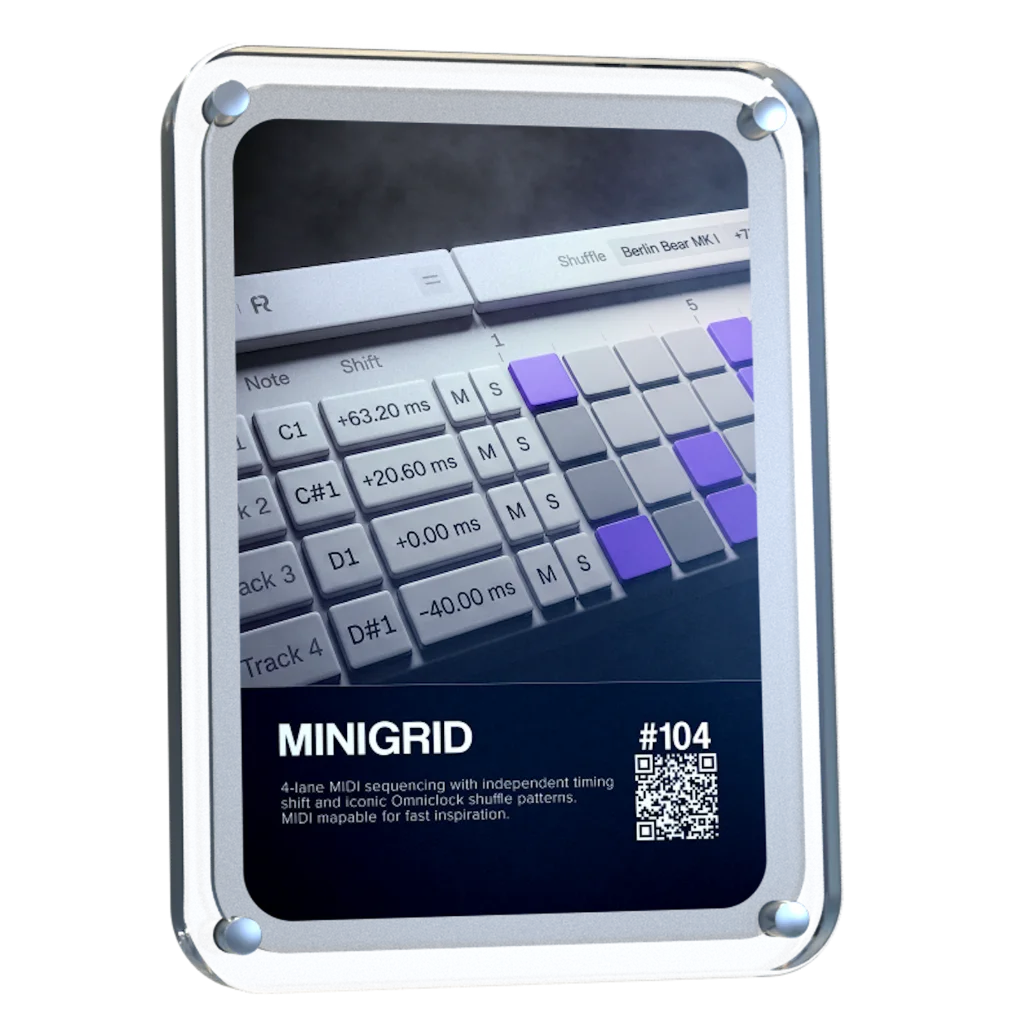
V 1.1.2 Updated with Velocity & MIDI export! Get 35% with code "MG35" - miniGRID is a 4-track MIDI sequencer VST3 / AU / AAX plugin for building drum patterns fast, with shuffle control and per-sound time-shifting to nail the groove, plus the ability to trigger external synths and hardware instruments via MIDI.

Regular price $29
Regular price Sale price $29
Sale
Shipping calculated at checkout.
Start Trial

4-lane MIDI sequencing with independent timing shift and signature Omniclock Shuffle

Producers icon 16.000+ producers
4.9/5 rating
View full details

A STEP SEQUENCER BUILT FOR THE POCKET

MiniGRID combines step sequencing with precise timing and groove control. Build patterns across 4 MIDI lanes, then push, pull, and shuffle notes to shape how every sound sits against the beat.

  • -64 ms to +64 ms shift per lane
  • Up to 32-step sequences + Adjustable step length
  • Route MIDI to any compatible plugin

Built By Request: Shape Velocity. Export MIDI.

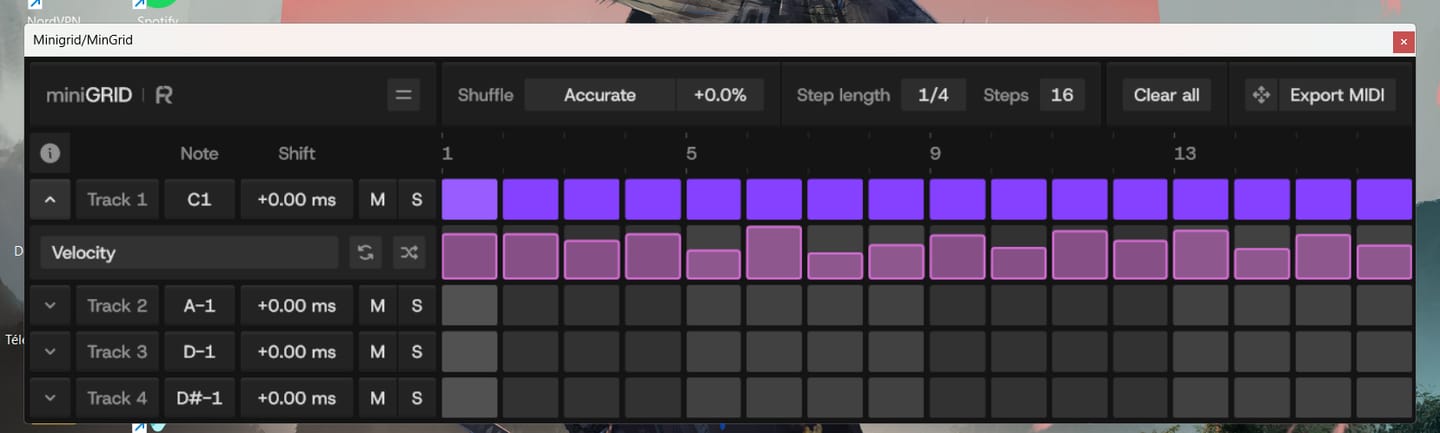
The most-requested miniGRID features are finally here. Shape every step with dedicated Velocity Lanes, randomize velocity to discover new grooves, and drag or export your MIDI directly into your DAW to keep creating. The update is free for all existing miniGRID users.

  • Create Accents & Ghost Notes
  • Ideal for Hi-Hats & Shakers
  • Direct MIDI Drag-and-Drop to DAW
Start Trial

Fully functional 45 day trial

Shift Each Lane. Find the Pocket

Control the timing of every lane independently. Push or pull notes until each sound sits exactly where it feels right against the beat.

  • ±64 ms shift range
  • Push snares early
  • Stays synced to your DAW’s transport

Add Omniclock's Signature Shuffle

Bring the signature Shuffle patterns from Omniclock directly into your sequences. Choose a pattern, dial in the amount, and add movement and groove to patterns that would otherwise sit straight on the grid

  • Iconic Shuffle Profiles (9×9, M60, EM-12 BIT & more)
  • Global Shuffle Across All 4 Lanes
  • Bring Static Patterns to Life

Sequence The Plugins You Already Use

Minigrid sends MIDI into compatible software instruments, letting you build and shape sequences using the sounds already in your setup.

  • Choose the MIDI note; Each lane triggers:
  • Sequence Drums, Percussion, Basses, Leads & More
  • Locks to Your DAW’s Transport & Playback

Small Grid. Serious Control

  • Per-Step Velocity Control
  • One-Click Velocity Randomize
  • Drag & Drop MIDI Export
  • 4 Independent MIDI Lanes
  • Up to 32-Step Sequences
  • -64 ms to +64 ms Time Shift Per Lane
  • Omniclock Shuffle Modes
  • Adjustable Shuffle Amount & Step Length
  • Assignable MIDI Note Per Lane
  • Direct MIDI Output to Any Compatible Plugin
  • DAW Transport Sync
  • Automatable Main Parameters
  • Per-Lane Mute & Solo
  • Resizable Interface Up to 400%
  • Light & Dark Theme Options

Trusted by the biggest names in Music Tech

  • Waldorf Music
  • RND
  • Dangerous Music
  • Focusrite
  • Slate
  • Ableton
  • Bitwig
  • LTL
  • Avalon
  • SSL
  • AudioScape
  • SPL
  • WES Audio
  • Novation
  • Strymon
  • Steinberg
  • Apple
  • AVID

The difference is obvious

miniGRID

  • Per-lane timing Shift
  • Omniclock Shuffle modes
  • ±64 ms timing control
  • Route into any compatible plugin

Start Trial

Fully functional 45 day trial

Header icon

Inspired By

7 Iconic Sequencers

Inspired by the timing behavior of legendary machines, bringing legendary vintage shuffle feel into your DAW without external hardware.

Drum Machine

Drum Machine

Roland TR-909

€6.000
INCLUDED
Drum Machine

Drum Machine

MFB Tanzbar

€1.000
INCLUDED
Sampler / Drum Machine

Sampler / Drum Machine

AKAI MPC60

€3.900
INCLUDED
Sampler / Drum Machine

Sampler / Drum Machine

E-MU SP-12

€2.700
INCLUDED
Sampler / Drum Machine

Sampler / Drum Machine

AKAI MPC 3000

€4.200
INCLUDED
Drum Machine

Drum Machine

Oberheim DMX

€3.900
INCLUDED
Drum Machine

Drum Machine

Linndrum LM-1

€10.000
INCLUDED
Drum Machine

Drum Machine

Roland TR-909

€6.000
INCLUDED
Drum Machine

Drum Machine

MFB Tanzbar

€1.000
INCLUDED
Sampler / Drum Machine

Sampler / Drum Machine

AKAI MPC60

€3.900
INCLUDED
Sampler / Drum Machine

Sampler / Drum Machine

E-MU SP-12

€2.700
INCLUDED
Sampler / Drum Machine

Sampler / Drum Machine

AKAI MPC 3000

€4.200
INCLUDED
Drum Machine

Drum Machine

Oberheim DMX

€3.900
INCLUDED
Drum Machine

Drum Machine

Linndrum LM-1

€10.000
INCLUDED

MIDI was made to be precise.We made it groove.

World’s-First: Vintage Groove & Step Sequencer Plugin

Start Trial

Fully functional 45 day trial

Roland TR-909

A legendary drum machine known for its punchy groove, tight shuffle, and driving rhythmic feel. The TR-909 shaped generations of house and techno with timing that feels mechanical, energetic, and alive.

MFB Tanzbar

A modern analog drum machine with tight, stable timing and subtle movement. Known for its solid clock and controlled groove, bridging classic feel with contemporary precision.

AKAI MPC 60

Designed by Roger Linn, the MPC60 introduced the swing that shaped hip-hop and electronic music. Its iconic, musical timing gives rhythms a natural, flowing feel.

EMU SP-12

An early 12-bit sampler with gritty sound and imperfect timing. Its uneven, human-like groove became a defining characteristic of classic hip-hop production.

AKAI MPC 3000

An evolution of the MPC60, offering tighter timing and more refined control. Known for its precise yet musical swing, widely used across genres for its balanced groove.

Oberheim DMX

One of the earliest digital drum machines, known for its punchy hits and slightly humanized timing. Its groove carries a raw, organic movement that defined early electronic and hip-hop rhythms.

Linn LM-1

A pioneering drum machine known for its human feel, loose groove, and natural rhythmic movement. The Linn LM-1 introduced the swing and timing character that shaped early hip-hop, pop, and electronic music.

No hardware required. Just your DAW.

MiniGRID brings the micro-timing and shuffle workflows of external MIDI clock gear directly into your DAW, giving you total groove control without adding another box to your desk.

  • Zero Hardware Setup Required
  • Shift & Shuffle Entirely In-The-Box
  • Simple control from one interface

Flexible Themes And Zoom Control

Customize miniGRID to fit your workspace with clean light and dark interface modes and flexible UI scaling, keeping your sequencer clear and easy to use at any screen size.

  • Light & Dark Interface Modes
  • Resizable Interface Up to 400%
  • Built for Different Screen Sizes
Header icon

Getting Started with MiniGRID

System Requirements

Omniclock runs as a lightweight plugin inside your DAW, designed to integrate seamlessly with your system and existing workflow.

Windows 10+

Windows 10+

VST3 64-bit

macOS 10.14+,<br> Intel, Apple Silicon

macOS 10.14+,
Intel, Apple Silicon

AU 64-bit, VST3 64-bit

Linux

Linux

Windows version on Wine + bridging VST3 with Yabridge

iLok Not Required

iLok Not Required

No physical dongle necessary

Compatibility

Our plug-ins should work with any compatible DAW. We test against the following:

Ableton

Ableton

Logic Pro

Logic Pro

Cubase

Cubase

FL Studio

FL Studio

Reaper

Reaper

Pro Tools

Pro Tools

FAQs

Do I need Omniclock to use this?

No, miniGRID is a fully standalone software plugin. While it includes signature Omniclock shuffle modes and micro-timing workflows, it runs completely inside your DAW and requires no external clock hardware to sequence or swing your tracks

What does miniGRID do?

miniGRID is a four-track MIDI step sequencer that sends MIDI notes to your software instruments. It lets you build patterns of up to 32 steps while adding independent timing shifts and hardware-inspired Shuffle to shape the groove.

How do I transition from Trial Mode to a purchased license?

License activation updates automatically. Just make sure to use the exact same email address when purchasing the license as you used when activating the trial

Can miniGRID be used to trigger external synths?

Yes, absolutely! Since miniGRID functions as a MIDI step sequencer plugin, its MIDI output can easily be routed to trigger external hardware synths.

Shift doesn’t work properly. How do I fix it?

Make sure the instrument you are sending MIDI into doesn’t quantize the incoming MIDI. This can cause the time shit or shuffle in miniGRID to misbehave.

Does miniGRID generate sound?

No. miniGRID generates MIDI notes, not audio. Route it into an instrument or plugin of your choice, and that instrument produces the sound.

How do I get the 0.02 ms step resolution for the Shift parameter?

Hold the Shift modifier key while dragging the Shift (time shift) control to use a 0.02 ms step resolution. Otherwise, the default step resolution is 0.2 ms.

Can I use miniGRID with any instrument plugin?

miniGRID can send MIDI to compatible instruments inside your DAW. Depending on your DAW, it can sit directly before the instrument or be routed from a separate track.

How do I route miniGRID in Ableton Live?

  1. Add miniGRID to a new MIDI track.
  2. Create a second MIDI track with your target instrument. 
  3. On the instrument track, set MIDI From to the miniGRID track, then select miniGRID in the dropdown directly below (channel selector). 
  4. Set the instrument track's Monitor to In and leave miniGRID's Monitor set to Auto

How do I route miniGRID in FL Studio?

  1. Insert miniGRID into a Mixer slot (Master insert recommended).
  2. Open miniGRID's plugin wrapper menu (v) → Settings, and choose a free MIDI output port (e.g., Port1).
  3. Open wrapper settings on your target plugin generator and set its MIDI input port to match (Port1).
  4. Under miniGRID’s wrapper Processing tab, turn Allow smart disable off.

How do I set up miniGRID in Logic Pro?

  1. Create a Software Instrument track with your synth/sampler.
  2. Click the top MIDI FX slot on the track's channel strip.
  3. Select Rapid Flow → miniGRID. (MIDI FX feed the instrument directly on the same channel strip without extra routing.)

Why does the AU version of the plugin not show up in my DAW?

The AU version will only show up in DAWs which support MIDI FX slots. Please use VST3, if you DAW doesn’t support MIDI FX slots.

How do I route miniGRID in Cubase / Nuendo?

  1. Insert miniGRID on any track (Audio, Group, or Instrument slot).
  2. Create an Instrument track with your target instrument.
  3. Set the instrument track's MIDI Input to miniGRID.
  4. Enable input monitoring on the instrument track.

How do I route miniGRID in Pro Tools?

  1. Insert miniGRID on a track as an AAX effect.
  2. Create an Instrument track with your software instrument.
  3. Switch the fader I/O display to Instrument I/O.
  4. Select miniGRID as the track's MIDI input.

What is the easiest way to run miniGRID in Bitwig or REAPER?

Place miniGRID directly above or before your instrument in the same device/FX chain. Both DAWs automatically pass miniGRID's generated MIDI down the chain to the instrument following it.

The first step doesn’t seem to send MIDI to my instrument. How do I fix it?

If you set a negative time shift, the first step would have to play before you start the transport. Every time you restart the transport or loop back to the beginning of your loop arrangement, the first steps with negative time shift in all lanes will be “skipped.”

Do you offer refunds?

All sales are final. Because our products are digital templates, samples, and instruments, they are considered "consumed" once delivered and cannot be returned. We provide a fully functional 45-day trial for our products and strongly encourage you to test it if you have any doubts before purchasing.

How Checkout Works: To ensure you get instant access to your sounds, our checkout includes two checkboxes. By ticking these, you agree to our terms and authorize us to provide your download immediately. Because this gives you instant access to the full product, the standard 14-day cooling-off period is waived at the point of purchase. If you encounter any technical issues or the files aren't working as expected, please reach out at support (at) rapidflow (dot) shop—we are always happy to help!

Trademark and Compatibility Disclaimer


All product names, logos, brands, and imagery of third-party hardware (such as those from AKAI, Oberheim, E-MU, or others) featured on this page are the property of their respective owners. These references and images are used solely for illustrative purposes to demonstrate suggested workflows. Use of these names and images does not imply any affiliation with, endorsement by, or sponsorship from the hardware manufacturers. Rapid Flow makes no claim of ownership over these trademarks and acknowledges that the "feel" or timing behavior described is a creative interpretation and not an official collaboration with the original manufacturers.

Customer Reviews

Overall rating: 4.8 / 5 from 26 reviews.

Customer photo review of Minigrid

Swings like nothing else 😍

Minigrid

Customer photo review of Minigrid

bonn materiel super de sortir de bon vst minigrid

Minigrid

Plugin i was waiting for a long time.

Minigrid

MiniGRID already has the feel of a tool built by someone who really knows the subject. The millisecond-level shift per lane, the groove control, the shuffle — these aren't boxes checked off a list, they're real musical intent. You're not just building a sequencer, you're building a way to let the machine breathe. That's exactly the kind of detail that separates a passion project from a generic one. The fact that you're thinking about the *why* — how a note sits against the beat — shows you're going for the feel, not just the function. That's the hardest thing to get right, and it's what gives an instrument a soul. Keep going. Every iteration is going to sharpen that feel. The idea is there, the direction is good — now it's the patient work that'll turn a strong concept into something people want to keep open for hours. Can't wait to see where it goes.

Minigrid

It actually brings new ideas and rhythms to my synths and drums. Especially I like using to experiment with the randombutton for velocity and the results... Nice.... :-)

Minigrid

Innovative and easy to use plugin. Very helpful. Thank you! :-)

Minigrid

Missing triplet grid

Minigrid

lets' groove!

Minigrid

Excellent

Minigrid

I have not played around with it as much as I would like too. Considering that I am taking some new medicine and I have to be attentive to me be careful with symptoms. That I may have at some point. I know that this is not the review that you are looking for but the plug-in sounds terrific and is awesome with everything amount of detail.

Minigrid

le service de support est incontestable le lien n'est pas en service ... très bien en vidéo mais en réalité très compliquée a avoir un support ... sur leur page le lien support ne marche pas ????

Minigrid

Bitwig fantastic Pro tools - had to have it b4 other plugins, I figured it out Luna - haven’t tried yet

Minigrid

Perfect!

Minigrid

Still getting to grips with this plugin but just loving the potential

Minigrid

I only wish it had more outputs.

Minigrid

Love the timing nuance the Minigrid provides

Minigrid

Super good idea, very well implemented. I use and love it. :)

Minigrid

Simple, yet brilliant!

Minigrid

Please make this Plugin Support velocitty, that’s all is missing ! Thanks!

Minigrid

Store owner replied: Hi Peter, the free update now supports velocity and MIDI export!

For an intro version, I'm enjoying being able to nudge timing of notes using this VST mapped to my controller. Looking forward to what will be added in future releases

Minigrid

Great!

Minigrid

It’s ok. Not worth the asking price as it does t bring much to the table.

Minigrid

I used to have an SP1200. I would still rather have it, but I had to sell it because I needed the money. The quality of the sequencing groove in that machine is equal to its sound. Once again, I have that groove back, plus so many more. When people justifiably favour outboard instruments and sequencers over ITB/DAWs, the sound is often the hero, but the groove and timing are a big part of that feel. So this is just what I needed as the best compromise, and I could not understand why it had not been done before. As I have wished for this for many years, finally! Thank you

Minigrid

It a great addition to my workflow and inspires new ideas when using it. Songs I’ve worked on have a more professional vibe thanks to the swing you can change per sample. Great job!

Minigrid

Great addition to help speed up my workflow!

Minigrid

Amazing device! Awaiting for the updates with probability,velocity and randomization functions!🙏

Minigrid