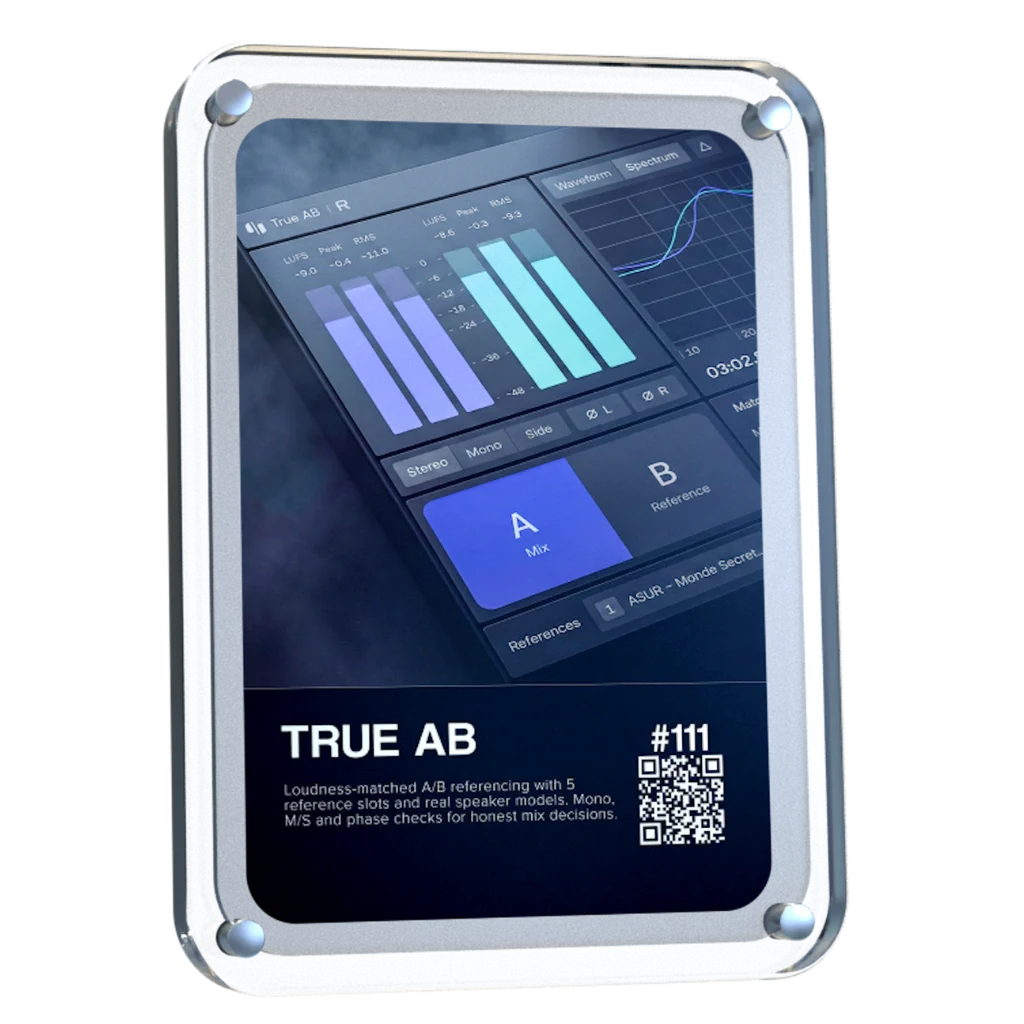
True AB helps you hear why your mix sounds different from a released track, from overpowering bass to details that get lost. Compare at matched loudness, see frequency differences, and explore phone, car and club speaker models without leaving your session.
Celebrate Rapid Flow’s four-year anniversary with us: fill out the newsletter signup form below for a code to get the full plugin 100% free, yours to keep.
True AB Referencing helps you hear how your track stacks up against released music, so you know what needs adjusting before it leaves your studio.
Compare at matched loudness
Check phone, car and club playback
Hear what disappears in mono
One Comparison Changed How I Mix.
For the first five years of my career, I underestimated A/B referencing. Then I took my laptop to a club where I used to DJ and played my unfinished track beside a released record. I immediately heard differences I’d been missing in the studio.
That experience showed me why referencing matters. We made flow AB referencing so you can make those comparisons inside your own session and hear what needs work, whatever setup you’re mixing on.
Erik Heirman, Founder of Rapid Flow
×
Hear your Mix Beside a Finished Track
Switch between your mix and a finished reference to hear the difference immediately. True AB referencing brings the reference down to your track’s level, so extra loudness won’t skew your judgment.
Compare against up to five reference tracks
Loop a chorus or drop for a closer listen
Switch references with one click
Check your Mix Beyond the Studio.
Start with the club system model and compare your track’s low-end weight with a released reference. Then explore the other playback models to hear which details stay clear and where the balance changes, while you can still make adjustments in your session.
Check bass audibility on phones
Check if your vocal loses level in mono
Spot overpowering bass in cars
Hear What Stereo Hides.
True AB lets you check what weakens in mono and listen to the side signal for low-end clutter in wide reverbs. Hear where the problem is before deciding what to change.
Stereo: Hear the full mix
Mono: Check what loses impact
Side: Inspect your wide effects
Find The Problem Before You EQ.
Expand the spectrum to inspect the frequency balance, check your loudness and peaks, or listen to the side signal for low-end clutter in wide effects. Give your next adjustment a clear reason.
LUFS, Peak and RMS metering
Expandable spectrum display
Whole-file or selected-loop views
Trusted by the biggest names in Music Tech
The Difference is Obvious
Mixing without a reference
Rely on memory
Louder can sound better
Guess where the balance is off
Judge through one playback setup
Miss what stereo hides
Mixing with True AB
Hear the difference instantly
Compare at matched loudness
Inspect frequency differences
Check five playback models
Check your mix in mono and side
Hear What To Change. Know Why.
Instant A-B Switching
Up to 5 Reference Tracks
Automatic Loudness Matching
Adjustable Reference Loops
5 Speaker & System Models
LUFS, Peak & RMS Metering
Expandable Spectrum Analyser
Stereo, Mono & Side Monitoring
Left - Right Polarity Invert
MIDI & Keyboard Mapping
Tap In - Out Loop Controls
Light & Dark Themes
Flexible Themes. Clearer Views.
Choose the view that keeps your session easy to follow. Switch between Light and Dark themes to suit your workspace, and expand the spectrum when you need a closer look at your mix’s frequency balance.
When you’re making dance music, especially trance, progressive house and anything built around a proper low-end, you can spend hours tweaking a mix and convince yourself it sounds incredible. Then you play it against a professionally mastered record, and suddenly you realise your kick is too heavy, your top end is harsh, or your whole mix lacks the weight and definition you thought it had.
That’s where Rapid Flow True AB Referencing comes into its own.
The first thing that stands out is the spectrum comparison. Having two tracks displayed together makes it much easier to spot differences in the overall tonal balance. You can see where your bass energy sits, how the mids are behaving, and whether your high frequencies are getting carried away. It’s particularly useful when you’re working on that tight, driving low end that trance and progressive house depend on.
I also like the fact that it brings several analysis tools together in one place. Spectrum, correlation, stereo image, dynamics and loudness are all accessible from the same interface. Rather than constantly jumping between different plugins, you have a central point for checking how your mix compares with a reference.
The reference library is another practical feature. Being able to load different records and switch between them is useful when you're trying to understand why one track feels huge and open, while another sounds thin or congested. For electronic music, I’d be comparing against properly mastered records in the same ballpark as my own production, not some random track from a completely different genre.
But here's the important bit: the analyser is a guide, not a mixing engineer.
A spectrum curve isn't a recipe for a professional master. A record with a massive bass peak isn't necessarily better than one with a tighter, more controlled low end. Different arrangements, kicks, basslines and mastering choices will produce different curves. And if you haven't level-matched your reference properly, you can end up making the wrong decisions simply because the louder track sounds more impressive.
First of all, giving this to the community as you did is 5 stars alone...especially for those of us in countries with horrendous exchange rates (Kenya). Secondly, to have THIS plugin do more than the other 'popular' one in my arsenal is pure gold. Third, the functionality just pushed my mixing skills to the international stage! Most importantly to me currently is that my old Macbook Pro 2014 on Big Sur, which often flatlines my CPU usage at the sight of a third party plugin is BARELY using any memory. You can literally see it in the screenshot! THANK YOU RAPID FLOW!
I won't say where from, but I only just purchase an A/B app and it only just about comes up to scratch to this amazing and FREE release! It will be my go-to for sure!
Loving the swiftness and simplicity of True AB from Rapidflow. There's so many useful features packed into this tool. I especially love how everything is essentially "right there". Nice one!
The speaker model function has been a game changer for me. I really love it. It gives fantastic simulation of different environments, something I've been searching for in a while and found it here.
I really found this helpful using a reference track to compare my mix with. I made changes that I wouldn’t have otherwise made. Thank you for helping my mixes sound more professional.
Un plugin increíble, era usuaria del A/B de otra compañia y lo reemplace por completo, mas claro, más intuitivo, hace todo lo que tiene que ser, realmente útil y preciso!! Feliz!!
You literally saved my life and my mixes. As a music producer it's always a bother to setup monitoring (cause I primarily use headphones) to know how your mix & masters are against references. Now I don't ever have to again thanks to you guys. A one stop shop for monitoring like a pro is priceless literally. Such a blessing...🙏🏾💯
True AB by Rapid Flow has quickly replaced my previous EQ reference plugin. It outperforms other market leaders thanks to several standout features:
• Real-time visual feedback for both active and reference tracks
• Seamless level matching
• Delta monitoring
• Support for up to 5 reference tracks simultaneously
It's awesome, autogain is a bit finicky, maybe add different modes? Like one for, peak, rms, etc, some filtering options - being able to hone in on any part of the spectrum, compare lows, high mids etc, stereo image, correlation and dynamics would be great, also different slope options, I prefer 4.5, and optimised sync...
I've been loving this product so much since I got it. It's very straightforward to use, and the auto-gain compensation makes comparing my mix with my reference track such a breeze. I love how intuitive the plugin is to use!
Finally, a tool — contained within a single app — that I previously had to piece together in my DAW using various separate components! Super helpful and exactly what’s needed.
Brilliant Plugin, it lets you listen in all environmental modes, phone, car, club, etc, and gives you a chance to fix what might be broken in your mix; it helps you find the sweet spot for what you need on the platforms mentioned above. The A B testing is so quick: just click on one of the slots at the bottom of the plugin, load your reference track, and done no messing about dropping it on one of your spare tracks in your DAW and having to manually mute it; it's all done in the plugin. Once again, a brilliant plugin. Thanks, The Invisible Resident
Beautiful tool which will be supporting my music production development, I am home studio producer, making my own music, not professionally trained, learnng through the tube.... Amner Hunter has been a big influence.
Thank you for this amazing Plugin.
This is an excellent plugin ... just as good as the paid versions ... very clean interface, making it a joy to work with ... amazing work. Many Thanks!
Honestly been looking for something like this with various ways of listening and a loudness matching aspect too. As a beginner it is essential for me to assess my work. Also the dark option looks great! Would highly recommend!
True AB Referencing runs as a lightweight plugin inside your DAW, designed to integrate seamlessly with your system and existing workflow.
Windows 10 V1604 or later
VST3 64-bit
macOS 10.14+, Intel, Apple Silicon
AU 64-bit, VST3 64-bit
Linux
Windows version on Wine + bridging VST3 with Yabridge
iLok Not Required
No physical dongle necessary
Compatibility
Our plug-ins should work with any compatible DAW. We test against the following:
Ableton
Logic Pro
Cubase
FL Studio
Reaper
Pro Tools
FAQs
How do I get True AB for free?
Sign up for our newsletter using the form on this page and confirm your email. We’ll send you a unique code for 100% off True AB. Apply it at checkout to claim your full license.
Why reference if my mix already sounds good in my studio?
Your room and speakers can hide problems. If you hear less bass than your track actually contains, you may add too much. Listening to a released reference through the same setup helps reveal differences you might otherwise miss.
Is the anniversary version a trial?
No. You get the full plugin with a perpetual license, yours to keep.
How does loudness matching help?
A louder track can seem better simply because it is louder. True AB lowers your reference to your mix’s level, making it easier to judge differences in balance without the volume difference influencing your decision.
Can I compare specific parts of a reference track?
Yes. Load up to five reference tracks and select one at a time. Set a loop by dragging the loop handles or using Tap In and Tap Out to compare a relevant chorus, drop or other passage.
Which speaker models are included?
True AB includes phone speaker, small studio speaker, mono speaker, car stereo and club system models. You can listen to both your mix and your reference through them to check how their balance compares.
Do I need a subscription or an iLok dongle?
No. True AB uses a perpetual license with direct activation. No subscription or iLok dongle is required.
Do you offer refunds?
All sales are final. Because our products are digital templates, samples, and instruments, they are considered "consumed" once delivered and cannot be returned. We provide a fully functional 45-day trial for our products and strongly encourage you to test it if you have any doubts before purchasing.
How Checkout Works: To ensure you get instant access to your sounds, our checkout includes two checkboxes. By ticking these, you agree to our terms and authorize us to provide your download immediately. Because this gives you instant access to the full product, the standard 14-day cooling-off period is waived at the point of purchase. If you encounter any technical issues or the files aren't working as expected, please reach out at support (at) rapidflow (dot) shop—we are always happy to help!
Trademark and Compatibility Disclaimer
All product names, brands, and trademarks mentioned on this page, including speaker, monitor, and device manufacturers (such as Yamaha, Auratone, etc.), belong to their respective owners. They are used only to describe the listening scenarios True AB's monitoring models are designed to approximate, and to make monitoring comparisons.
True AB's monitoring models are creative approximations of how a mix may translate on these types of systems, not exact reproductions of any specific product. Rapid Flow is not affiliated with, endorsed by, or sponsored by any of the companies named, and makes no claim of ownership over their trademarks.
True AB does not include any reference audio. Users are responsible for making sure they have the right to use any reference tracks they load into the plugin.
Choosing a selection results in a full page refresh.