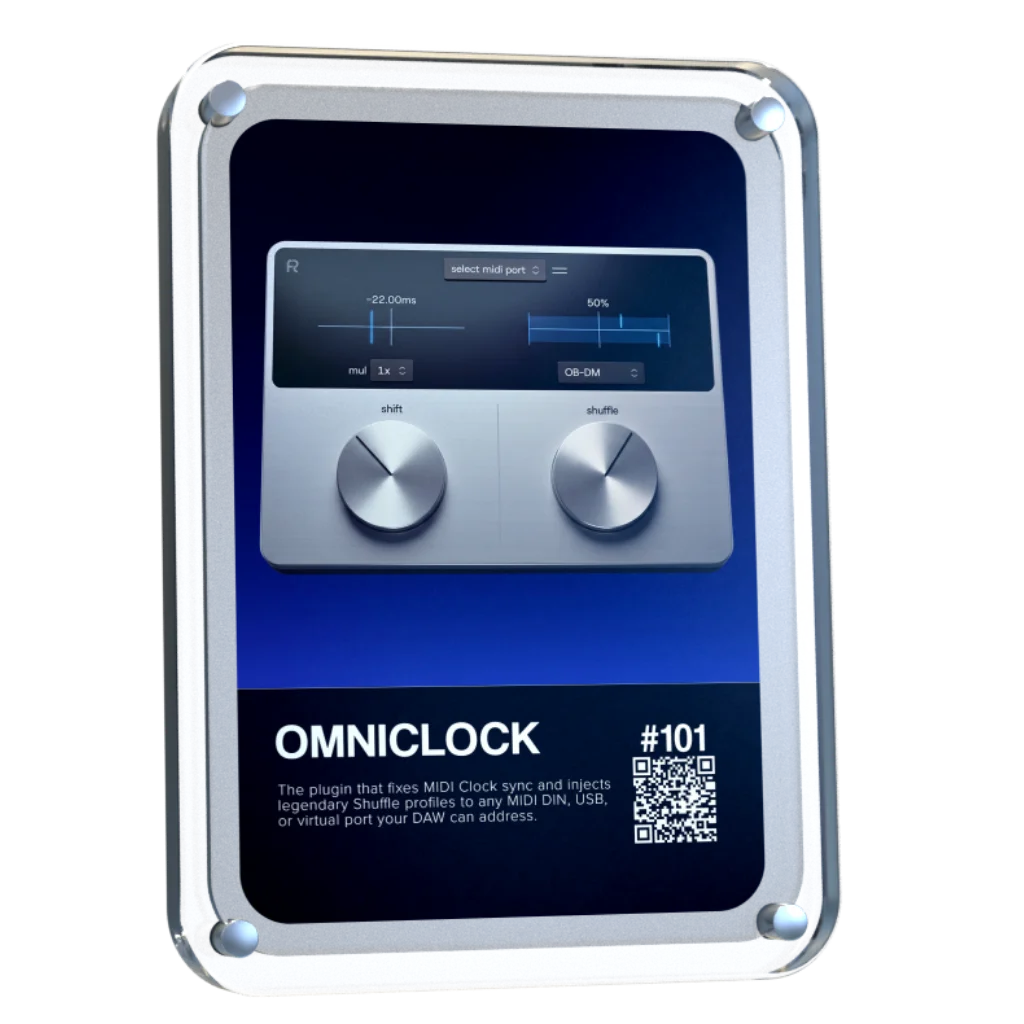
Omniclock
Skip to product information
1 of 1

FIX SYNC. ADD GROOVE.

Omniclock

Omniclock

✅ Shift MIDI Clock: Independent stable clock generation
✅ Iconic Shuffle Profiles: Inspired by legendary machines
✅ Total Routing Freedom: USB and 5-Pin MIDI

Regular price $49
Regular price $69 Sale price $49
Sale

LIMITED TIME OFFER

Shipping calculated at checkout.
Start Trial

"I bought it and it works!" - Carl Craig

Producers icon 14.000+ producers
4.9/5 rating
View full details

Trusted by the biggest names in Music Tech

  • Waldorf Music
  • RND
  • Dangerous Music
  • Focusrite
  • Slate
  • Ableton
  • Bitwig
  • LTL
  • Avalon
  • SSL
  • AudioScape
  • SPL
  • WES Audio
  • Novation
  • Strymon
  • Steinberg
  • Apple
  • AVID

FINALLY A PLUGIN THAT SHIFTS MIDI CLOCK

Omniclock delivers rock-solid MIDI clock to your hardware with sub-millisecond accurate precision. (Results can vary by setup) When you’re ready to move beyond standard timing, simply engage one of our legendary shuffle modes. Experience the instant 'magic' of classic swing patterns, perfectly calibrated to bring your hardware to life directly from your DAW.

  • Per output clock shift
  • Iconic swing patterns
  • No sync box needed
  • Reference manual

The difference is obvious

Omniclock

  • Affordable
  • Unlimited outputs
  • Full DAW recall
  • Intuitive setup

MIDI Clock in 0.25 ms steps

Shift lets you adjust the MIDI clock to match the response of your hardware, keeping everything aligned across your setup.

✅ Forward and backward clock offset
✅ Map a MIDI control and tweak by feel
✅ 1x / 2x / 4x shift multipliers

Omniclock_Techno

Legendary Shuffle Patterns in your DAW

Shuffle applies swing to the MIDI clock, shaping the feel across your hardware. Inspired by iconic sequencers, it brings the hardware magic shuffle and swing patterns to your DAW, even including jitter and drift for maximum authenticity.

✅ Iconic Shuffle Profiles (9×9, M60, EM-12 BIT & more)
✅ No changes to MIDI notes or patterns required
✅ 8 shuffle profiles with unique timing behavior

Adaptive Shuffle Curves

Offering tight response across a wide range of hardware, the shuffle curves optimize how swing is applied to the MIDI clock. They also shape the groove in unique ways, offering both precision and creative control.

✅ Stable timing across a wide range of hardware manufacturers
✅ Tested with Roland, Korg, Moog, Elektron, Arturia, Behringer, Sequential, Nord, AKAI & MFB
✅ Can be used creatively to shape groove and feel

Total Recall and Routing Freedom

Give every machine its own groove with flexible routing over USB, MIDI DIN, and virtual ports. With precise clock shifting and full DAW recall, Omniclock keeps your setup tight, musical, and alive.

✅ Per-output clock shifting with 0.25ms precision
✅ Supports tempo changes and loop playback
✅ Built for hybrid studio setups

Header icon

Inspired By

7 Iconic Sequencers

Inspired by the timing behavior of legendary machines, bringing legendary vintage shuffle feel into your DAW without external hardware.

Drum Machine

Drum Machine

Roland TR-909

€6.000
INCLUDED
Drum Machine

Drum Machine

MFB Tanzbar

€1.000
INCLUDED
Sampler / Drum Machine

Sampler / Drum Machine

AKAI MPC60

€3.900
INCLUDED
Sampler / Drum Machine

Sampler / Drum Machine

E-MU SP-12

€2.700
INCLUDED
Sampler / Drum Machine

Sampler / Drum Machine

AKAI MPC 3000

€4.200
INCLUDED
Drum Machine

Drum Machine

Oberheim DMX

€3.900
INCLUDED
Drum Machine

Drum Machine

Linndrum LM-1

€10.000
INCLUDED
Drum Machine

Drum Machine

Roland TR-909

€6.000
INCLUDED
Drum Machine

Drum Machine

MFB Tanzbar

€1.000
INCLUDED
Sampler / Drum Machine

Sampler / Drum Machine

AKAI MPC60

€3.900
INCLUDED
Sampler / Drum Machine

Sampler / Drum Machine

E-MU SP-12

€2.700
INCLUDED
Sampler / Drum Machine

Sampler / Drum Machine

AKAI MPC 3000

€4.200
INCLUDED
Drum Machine

Drum Machine

Oberheim DMX

€3.900
INCLUDED
Drum Machine

Drum Machine

Linndrum LM-1

€10.000
INCLUDED

Your hardware has a soul. Now your DAW does too.

World’s‑First: MIDI Clock & Vintage Shuffle Plugin

Omniclock Videos

Omniclock Overview

Complete Omniclock functionality and shuffle pattern overview

In use with hardware sequencers

Using Omniclock with Arturia Beatstep Pro & Torso T-1

Slaving hardware with MIDI clock

Setup video with Elektron, Moog, AKAI, Roland, Korg, Torso, Arturia, Behringer, MFB & Nord

Roland TR-909

A legendary drum machine known for its punchy groove, tight shuffle, and driving rhythmic feel. The TR-909 shaped generations of house and techno with timing that feels mechanical, energetic, and alive.

MFB Tanzbar

A modern analog drum machine with tight, stable timing and subtle movement. Known for its solid clock and controlled groove, bridging classic feel with contemporary precision.

AKAI MPC 60

Designed by Roger Linn, the MPC60 introduced the swing that shaped hip-hop and electronic music. Its iconic, musical timing gives rhythms a natural, flowing feel.

EMU SP-12

An early 12-bit sampler with gritty sound and imperfect timing. Its uneven, human-like groove became a defining characteristic of classic hip-hop production.

AKAI MPC 3000

An evolution of the MPC60, offering tighter timing and more refined control. Known for its precise yet musical swing, widely used across genres for its balanced groove.

Oberheim DMX

One of the earliest digital drum machines, known for its punchy hits and slightly humanized timing. Its groove carries a raw, organic movement that defined early electronic and hip-hop rhythms.

Linn LM-1

A pioneering drum machine known for its human feel, loose groove, and natural rhythmic movement. The Linn LM-1 introduced the swing and timing character that shaped early hip-hop, pop, and electronic music.

Everything, in Time

Inspired by the timing behavior of legendary machines, Omniclock brings the subtle imperfections that define groove back into your setup.

✅ Iconic hardware timing
✅ Accurate mode included
✅ Early to modern drum machines

Flexible Themes And Zoom Control

Personalize Omniclock with multiple built-in skins designed for different creative environments. Adjustable zoom scaling keeps the workflow comfortable, focused, and easy to control.

✅ 7 unique interface skins
✅ Zoom scaling from 50% to 400%
✅ Optimized for laptop and high resolution screens

Sync your hardware. Restore the feel.

Hardware setups drift out of sync, and tight timing alone does not guarantee groove. Omniclock combines timing, groove, and routing inside your DAW, giving every machine precise sync with natural movement and feel.

✅ Eliminates sync drift between devices
✅ No external sync box needed
✅ Simple control from one interface

Header icon

Getting Started with Omniclock

System Requirements

Omniclock runs as a lightweight plugin inside your DAW, designed to integrate seamlessly with your system and existing workflow.

Windows 10+

Windows 10+

VST3 64-bit

macOS 10.14+,<br> Intel, Apple Silicon

macOS 10.14+,
Intel, Apple Silicon

AU 64-bit, VST3 64-bit

Linux

Linux

Windows version on Wine + bridging VST3 with Yabridge

iLok Not Required

iLok Not Required

No physical dongle necessary

Compatibility

Our plug-ins should work with any compatible DAW. We test against the following:

Ableton

Ableton

Logic Pro

Logic Pro

Cubase

Cubase

FL Studio

FL Studio

Reaper

Reaper

Pro Tools

Pro Tools

FAQs

How accurate is Omniclock?

We generally see jitter values in accurate mode ranging betwen 0.5 and 1 ms. on most users systems. https://cdn.shopify.com/s/files/1/0684/1896/1730/files/Omniclock_MIDI_Clock_shifting_plugin_measurements.jpg?v=1781012855

What does Omniclock do?

Omniclock is a precision-driven timing and shuffle engine designed to bring externally slaved gear into the pocket and add vintage shuffle vibe. It is the first plugin of it's kind and brings you highly accurate shiftable MIDI clock sync, at a price anyone can afford.

Can I use this to affect plugins?

Currently, this cannot be done inside your DAW. As a workaround, route the Omniclock MIDI clock to an external hardware sequencer (e.g., Arturia Beatstep Pro or Torso T-1). By shifting and shuffling the clock on your connected hardware, you can then route those MIDI notes back into your DAW to control any software plugin with the same timing effect.

How should I route Omniclock inside my DAW?

Load Omniclock on a dedicated MIDI track or MIDI FX slot (AU in Logic) and route its MIDI outputs to the external device ports you want to clock. Use a separate MIDI track/channel per connected device.

Do I need to disable my DAW’s MIDI clock output when using Omniclock?

Yes. Disable MIDI clock output from your DAW on any port that Omniclock also uses to avoid conflicting clock signals.

Can I send MIDI clock from both my DAW and Omniclock at the same time?

No. Sending clock from both will likely cause double tempo or other sync errors. Only one source should clock a given device

Should I use a separate MIDI track/channel for each external device?

Yes. Use a separate MIDI track/channel for each connected device to keep each device’s routing and timing isolated and predictable.

Do you offer refunds?

All sales are final. Because our products are digital in nature, we do not provide refunds. Our offerings are digital templates, samples and plugins—intangible goods that you access via download or online activation. Once these products are delivered or made available to you, they cannot be “returned” in the traditional sense.

Trademark and Compatibility Disclaimer


All product names, logos, brands, and imagery of third-party hardware (such as those from AKAI, Oberheim, E-MU, or others) featured on this page are the property of their respective owners. These references and images are used solely for illustrative purposes to demonstrate suggested workflows. Use of these names and images does not imply any affiliation with, endorsement by, or sponsorship from the hardware manufacturers. Rapid Flow makes no claim of ownership over these trademarks and acknowledges that the "feel" or timing behavior described is a creative interpretation and not an official collaboration with the original manufacturers.